---
title: Navigation & Devices Using the Visual Editor
description: SiteSpect's Visual Editor allows you to make many changes to your webpages to update its visual appearance. When making changes across your site it is possible to navigate to the pages you require us
---
[Skip to content](https://doc.sitespect.com/knowledge/navigation-using-the-visual-editor#main-content)
English
Show submenu for translations

- [A/B Testing](https://www.sitespect.com/testing-and-experimentation/)
- [Personalization](https://www.sitespect.com/personalization-targeting/)
- [Recommendations](https://www.sitespect.com/recommendations/)
Open main navigation
Close main navigation
- [A/B Testing](https://www.sitespect.com/testing-and-experimentation/)
- [Personalization](https://www.sitespect.com/personalization-targeting/)
- [Recommendations](https://www.sitespect.com/recommendations/)
- English
Show submenu for translations
How can we help you?
- There are no suggestions because the search field is empty.
1. [Knowledge Base](https://doc.sitespect.com/knowledge?hsLang=en)
2. [Build](https://doc.sitespect.com/knowledge/build?hsLang=en)
3. [Create a Client-Side Campaign](https://doc.sitespect.com/knowledge/build?hsLang=en#create-a-client-side-campaign)
# Navigation & Devices Using the Visual Editor
SiteSpect's Visual Editor allows you to make many changes to your webpages to update its visual appearance. When making changes across your site it is possible to navigate to the pages you require using several different approaches and across multiple device types. It is important to recognize these since the default view for the **Visual Editor** is the edit mode and a right click in this mode will select elements on a page rather then navigate.
1\) Open your site in SiteSpect's **Visual Editor.**
2\) Navigate to the page(s) that contain the element you wish to modify using:
**Go To Page:**
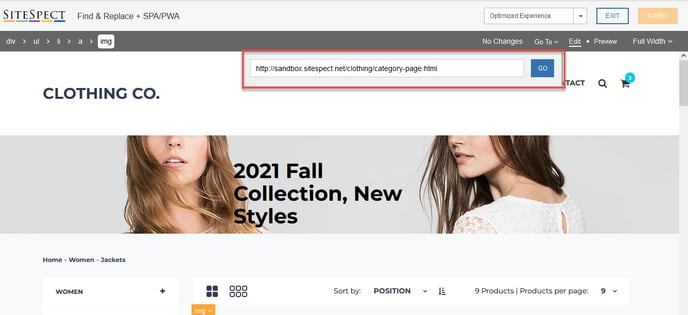
**Preview Mode:**
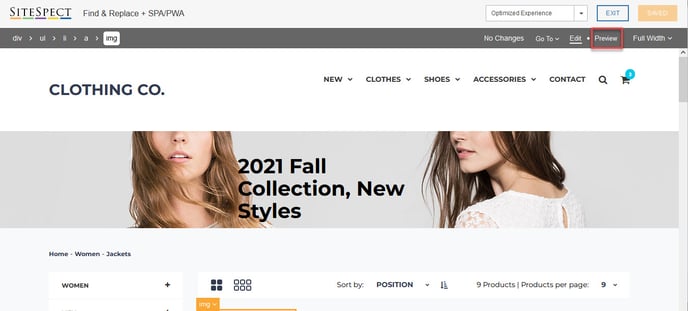
Right click **'Click Element':**
**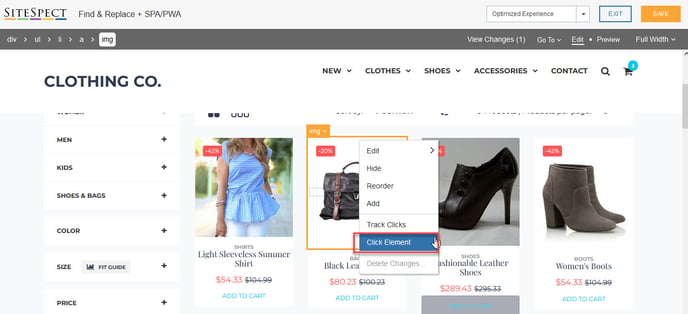**
You can select a range of different device types from desktop to various tablet and smartphone sizes. It is also possible to specify custom dimensions should the predefined list not offer the device you need. To do this simply select the device dropdown in the top right of the Visual Editors menu.
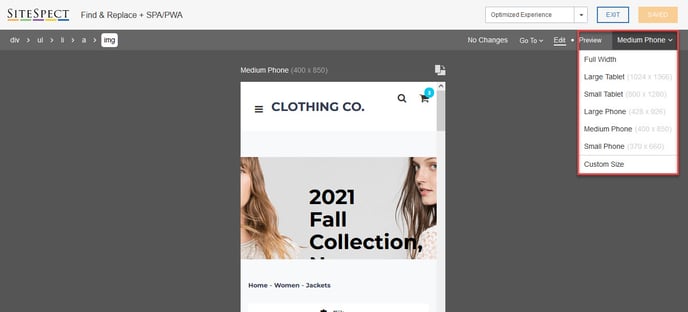
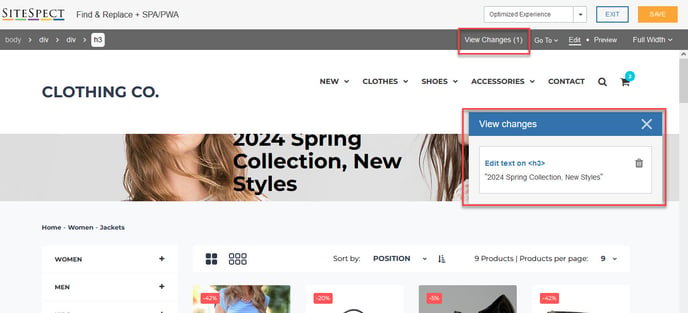
Using the **View Changes** option in the header navigation can also help to locate specific changes on a variation group for you. Launching this list and then clicking the title of an element within the **Change List** will anchor your browser to that specific change so you can modify or delete it.
- [Get Started](https://doc.sitespect.com/knowledge/get-started?hsLang=en#main-content)
- [SiteSpect Support](https://doc.sitespect.com/knowledge/get-started?hsLang=en#sitespect-support)
- [Overview Information](https://doc.sitespect.com/knowledge/get-started?hsLang=en#overview-information)
- [Intro to SiteSpect](https://doc.sitespect.com/knowledge/get-started?hsLang=en#intro-to-sitespect)
- [Account Setup](https://doc.sitespect.com/knowledge/get-started?hsLang=en#account-setup)
- [Artificial Intelligence](https://doc.sitespect.com/knowledge/get-started?hsLang=en#artificial-intelligence)
- [Dashboard](https://doc.sitespect.com/knowledge/dashboard?hsLang=en)
- [Build](https://doc.sitespect.com/knowledge/build?hsLang=en#main-content)
- [Setting Up a Campaign](https://doc.sitespect.com/knowledge/build?hsLang=en#setting-up-a-campaign)
- [Create a Client-Side Campaign](https://doc.sitespect.com/knowledge/build?hsLang=en#create-a-client-side-campaign)
- [Create a Server-Side Campaign](https://doc.sitespect.com/knowledge/build?hsLang=en#create-a-server-side-campaign)
- [Metrics](https://doc.sitespect.com/knowledge/build?hsLang=en#metrics)
- [Audiences](https://doc.sitespect.com/knowledge/build?hsLang=en#audiences)
- [Triggers](https://doc.sitespect.com/knowledge/build?hsLang=en#triggers)
- [Variations](https://doc.sitespect.com/knowledge/build?hsLang=en#variations)
- [Traffic Management](https://doc.sitespect.com/knowledge/build?hsLang=en#traffic-management)
- [Preview](https://doc.sitespect.com/knowledge/build?hsLang=en#preview)
- [Factors](https://doc.sitespect.com/knowledge/build?hsLang=en#factors)
- [Advanced Settings](https://doc.sitespect.com/knowledge/build?hsLang=en#advanced-settings)
- [Omnichannel](https://doc.sitespect.com/knowledge/build?hsLang=en#omnichannel)
- [Regular Expressions (Regex)](https://doc.sitespect.com/knowledge/build?hsLang=en#regular-expressions-regex)
- [WATTS](https://doc.sitespect.com/knowledge/build?hsLang=en#watts)
- [Recommendations](https://doc.sitespect.com/knowledge/build?hsLang=en#recommendations)
- [Monitor](https://doc.sitespect.com/knowledge/monitor?hsLang=en)
- [Analyze](https://doc.sitespect.com/knowledge/analyze?hsLang=en#main-content)
- [Data Export and Integration](https://doc.sitespect.com/knowledge/analyze?hsLang=en#data-export-and-integration)
- [SiteSpect Reports](https://doc.sitespect.com/knowledge/analyze?hsLang=en#sitespect-reports)
- [Site](https://doc.sitespect.com/knowledge/site?hsLang=en#main-content)
- [Tools](https://doc.sitespect.com/knowledge/site?hsLang=en#tools)
- [Configuration](https://doc.sitespect.com/knowledge/site?hsLang=en#configuration)
- [Developers](https://doc.sitespect.com/knowledge/developers?hsLang=en#main-content)
- [API Reference](https://doc.sitespect.com/knowledge/developers?hsLang=en#api-reference)
- [Code Samples](https://doc.sitespect.com/knowledge/developers?hsLang=en#code-samples)
- [Tips & Tricks](https://doc.sitespect.com/knowledge/developers?hsLang=en#tips-tricks)
- [Mobile](https://doc.sitespect.com/knowledge/mobile?hsLang=en)
- [Implementation, Deployment, and Security](https://doc.sitespect.com/knowledge/implementation-deployment-and-security?hsLang=en#main-content)
- [How does SiteSpect work with CDNs?](https://doc.sitespect.com/knowledge/implementation-deployment-and-security?hsLang=en#how-does-sitespect-work-with-cdns)
- [Single Tenant Implementations](https://doc.sitespect.com/knowledge/implementation-deployment-and-security?hsLang=en#single-tenant-implementations)
- [Security Features](https://doc.sitespect.com/knowledge/implementation-deployment-and-security?hsLang=en#security-features)
- [Deployment and Implementation Overview](https://doc.sitespect.com/knowledge/implementation-deployment-and-security?hsLang=en#deployment-and-implementation-overview)
- [SiteSpect Engine & Admin API](https://doc.sitespect.com/knowledge/implementation-deployment-and-security?hsLang=en#sitespect-engine-admin-api)
- [Third-Party Integration](https://doc.sitespect.com/knowledge/third-party-integration?hsLang=en#main-content)
- [Google](https://doc.sitespect.com/knowledge/third-party-integration?hsLang=en#google)
- [Zuko](https://doc.sitespect.com/knowledge/third-party-integration?hsLang=en#zuko)
- [Troubleshooting](https://doc.sitespect.com/knowledge/troubleshooting?hsLang=en)
- [Releases](https://doc.sitespect.com/knowledge/releases?hsLang=en#main-content)
- [Superfresh](https://doc.sitespect.com/knowledge/releases?hsLang=en#superfresh)
- [Feedback](https://doc.sitespect.com/knowledge/feedback?hsLang=en)
- [A/B Testing](https://www.sitespect.com/testing-and-experimentation/)
- [Personalization](https://www.sitespect.com/personalization-targeting/)
- [Recommendations](https://www.sitespect.com/recommendations/)
[](http://monetate.com)
[mailto:email@email.com](mailto:email@email.com)
Copyright © 2026, Monetate