---
title: Building a Release Test Using Alternate Origin
description: The alternate origin feature can be used to progressively rollout a new infrastructure, or to rollout a new release.
---
[Skip to content](https://doc.sitespect.com/knowledge/building-a-release-test#main-content)
English
Show submenu for translations

- [A/B Testing](https://www.sitespect.com/testing-and-experimentation/)
- [Personalization](https://www.sitespect.com/personalization-targeting/)
- [Recommendations](https://www.sitespect.com/recommendations/)
Open main navigation
Close main navigation
- [A/B Testing](https://www.sitespect.com/testing-and-experimentation/)
- [Personalization](https://www.sitespect.com/personalization-targeting/)
- [Recommendations](https://www.sitespect.com/recommendations/)
- English
Show submenu for translations
How can we help you?
- There are no suggestions because the search field is empty.
1. [Knowledge Base](https://doc.sitespect.com/knowledge?hsLang=en)
2. [Build](https://doc.sitespect.com/knowledge/build?hsLang=en)
3. [Create a Server-Side Campaign](https://doc.sitespect.com/knowledge/build?hsLang=en#create-a-server-side-campaign)
# Building a Release Test Using Alternate Origin
## The alternate origin feature can be used to progressively rollout a new infrastructure, or to rollout a new release.
When you need to evaluate a new release of your website or a deployment to an entirely new server, SiteSpect allows you to test these scenarios using our Alternate Origin capability. For example, let's say you are developing a new website and you want to test it. You've got your usual production environment (www.site.com), which you want to test against this new environment (say www.adifferentsite.com). You can create a Campaign that will test the two environments against each other on your live traffic. The following example describes how.
The steps look like this at a high level:
1. SiteSpect Professional Services configures the alternative proxy domain.
2. A SiteSpect user then creates an Origin Experiment variation.
3. Validate that the alternate origin is accepting traffic from SiteSpect.
Here is another page that describes [how Alternative Proxy works](https://doc.sitespect.com/knowledge/cross-domain-tracking-with-sitespect?hsLang=en).
### 1. Configure the alternative proxy domain
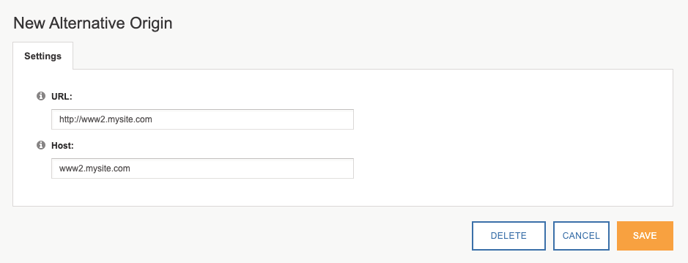
SiteSpect Professional Services will set up this step for you. Once configured, you can select this URL in variations using the Alternative Origin option.
#### Specify the protocol, domain, and (optional) path that you want to use as an alternate origin.
For example, you have a new version of your website that you want to test. Your new site lives in a different environment ([www2.mysite.com](http://www2.mysite.com/)) from your production site ([http://www.mysite.com](http://www.mysite.com/)). In this case, enter [http://www2.mysite.com](http://www2.mysite.com/) for the URL.
This change requires an engine restart to take effect.
#### Specify the host header
Host header is not required to match the URL, but will most often be the same. If unsure, enter the same as the alternative origin URL.
For example, you have a new version of your website that you want to test. Your new site lives in a different environment ([www2.mysite.com](http://www2.mysite.com/)) from your production site ([http://www.mysite.com](http://www.mysite.com/)). In this case, enter [www2.mysite.com](http://www2.mysite.com/) for the Host.
### 2. Create an Origin Experiment variation
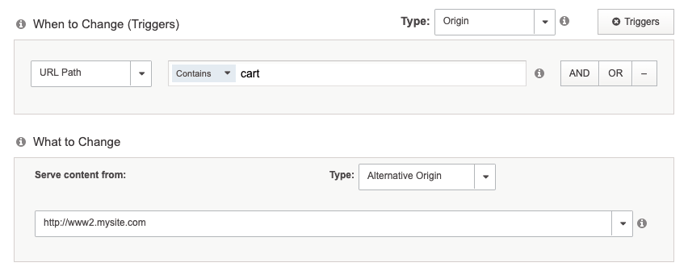
In your campaign, select a variation type of **Origin** and change type of **Alternative Origin**. From there, you will see a dropdown where you can select one of the alternative origins that are configured for your site. If your campaign has a control experience, select "Original Origin" to keep users on your existing site for that variation.
Add any necessary triggers to satisfy your test requirements.
### 3. Validate that the Alternate Origin is accepting traffic from SiteSpect
Preview your variation group(s) to ensure that traffic is routing through the alternate origin as expected.
In some instances, if the origin refuses traffic, you may need to adjust the host header defined in step 1. If you suspect this is the case, work with the professional services team to update the configuration.
Once you have confirmed the alternate origin is working, follow your standard preview QA process to validate the campaign experience.
- [Get Started](https://doc.sitespect.com/knowledge/get-started?hsLang=en#main-content)
- [SiteSpect Support](https://doc.sitespect.com/knowledge/get-started?hsLang=en#sitespect-support)
- [Overview Information](https://doc.sitespect.com/knowledge/get-started?hsLang=en#overview-information)
- [Intro to SiteSpect](https://doc.sitespect.com/knowledge/get-started?hsLang=en#intro-to-sitespect)
- [Account Setup](https://doc.sitespect.com/knowledge/get-started?hsLang=en#account-setup)
- [Artificial Intelligence](https://doc.sitespect.com/knowledge/get-started?hsLang=en#artificial-intelligence)
- [Dashboard](https://doc.sitespect.com/knowledge/dashboard?hsLang=en)
- [Build](https://doc.sitespect.com/knowledge/build?hsLang=en#main-content)
- [Setting Up a Campaign](https://doc.sitespect.com/knowledge/build?hsLang=en#setting-up-a-campaign)
- [Create a Client-Side Campaign](https://doc.sitespect.com/knowledge/build?hsLang=en#create-a-client-side-campaign)
- [Create a Server-Side Campaign](https://doc.sitespect.com/knowledge/build?hsLang=en#create-a-server-side-campaign)
- [Metrics](https://doc.sitespect.com/knowledge/build?hsLang=en#metrics)
- [Audiences](https://doc.sitespect.com/knowledge/build?hsLang=en#audiences)
- [Triggers](https://doc.sitespect.com/knowledge/build?hsLang=en#triggers)
- [Variations](https://doc.sitespect.com/knowledge/build?hsLang=en#variations)
- [Traffic Management](https://doc.sitespect.com/knowledge/build?hsLang=en#traffic-management)
- [Preview](https://doc.sitespect.com/knowledge/build?hsLang=en#preview)
- [Factors](https://doc.sitespect.com/knowledge/build?hsLang=en#factors)
- [Advanced Settings](https://doc.sitespect.com/knowledge/build?hsLang=en#advanced-settings)
- [Omnichannel](https://doc.sitespect.com/knowledge/build?hsLang=en#omnichannel)
- [Regular Expressions (Regex)](https://doc.sitespect.com/knowledge/build?hsLang=en#regular-expressions-regex)
- [WATTS](https://doc.sitespect.com/knowledge/build?hsLang=en#watts)
- [Recommendations](https://doc.sitespect.com/knowledge/build?hsLang=en#recommendations)
- [Monitor](https://doc.sitespect.com/knowledge/monitor?hsLang=en)
- [Analyze](https://doc.sitespect.com/knowledge/analyze?hsLang=en#main-content)
- [Data Export and Integration](https://doc.sitespect.com/knowledge/analyze?hsLang=en#data-export-and-integration)
- [SiteSpect Reports](https://doc.sitespect.com/knowledge/analyze?hsLang=en#sitespect-reports)
- [Site](https://doc.sitespect.com/knowledge/site?hsLang=en#main-content)
- [Tools](https://doc.sitespect.com/knowledge/site?hsLang=en#tools)
- [Configuration](https://doc.sitespect.com/knowledge/site?hsLang=en#configuration)
- [Developers](https://doc.sitespect.com/knowledge/developers?hsLang=en#main-content)
- [API Reference](https://doc.sitespect.com/knowledge/developers?hsLang=en#api-reference)
- [Code Samples](https://doc.sitespect.com/knowledge/developers?hsLang=en#code-samples)
- [Tips & Tricks](https://doc.sitespect.com/knowledge/developers?hsLang=en#tips-tricks)
- [Mobile](https://doc.sitespect.com/knowledge/mobile?hsLang=en)
- [Implementation, Deployment, and Security](https://doc.sitespect.com/knowledge/implementation-deployment-and-security?hsLang=en#main-content)
- [How does SiteSpect work with CDNs?](https://doc.sitespect.com/knowledge/implementation-deployment-and-security?hsLang=en#how-does-sitespect-work-with-cdns)
- [Single Tenant Implementations](https://doc.sitespect.com/knowledge/implementation-deployment-and-security?hsLang=en#single-tenant-implementations)
- [Security Features](https://doc.sitespect.com/knowledge/implementation-deployment-and-security?hsLang=en#security-features)
- [Deployment and Implementation Overview](https://doc.sitespect.com/knowledge/implementation-deployment-and-security?hsLang=en#deployment-and-implementation-overview)
- [SiteSpect Engine & Admin API](https://doc.sitespect.com/knowledge/implementation-deployment-and-security?hsLang=en#sitespect-engine-admin-api)
- [Third-Party Integration](https://doc.sitespect.com/knowledge/third-party-integration?hsLang=en#main-content)
- [Google](https://doc.sitespect.com/knowledge/third-party-integration?hsLang=en#google)
- [Zuko](https://doc.sitespect.com/knowledge/third-party-integration?hsLang=en#zuko)
- [Troubleshooting](https://doc.sitespect.com/knowledge/troubleshooting?hsLang=en)
- [Releases](https://doc.sitespect.com/knowledge/releases?hsLang=en#main-content)
- [Superfresh](https://doc.sitespect.com/knowledge/releases?hsLang=en#superfresh)
- [Feedback](https://doc.sitespect.com/knowledge/feedback?hsLang=en)
- [A/B Testing](https://www.sitespect.com/testing-and-experimentation/)
- [Personalization](https://www.sitespect.com/personalization-targeting/)
- [Recommendations](https://www.sitespect.com/recommendations/)
[](http://monetate.com)
[mailto:email@email.com](mailto:email@email.com)
Copyright © 2026, Monetate